> For the complete documentation index, see [llms.txt](https://wiki.landania.net/llms.txt). Markdown versions of documentation pages are available by appending `.md` to page URLs; this page is available as [Markdown](https://wiki.landania.net/english/systems/report-system.md).
# Report System
Everything about reporting players via the in-house report system.
If players break the [rules](/english/general/rules-and-regulations.md), they can be reported via the report system. All relevant information about the player will be sent directly to the team for verification.
### Usage
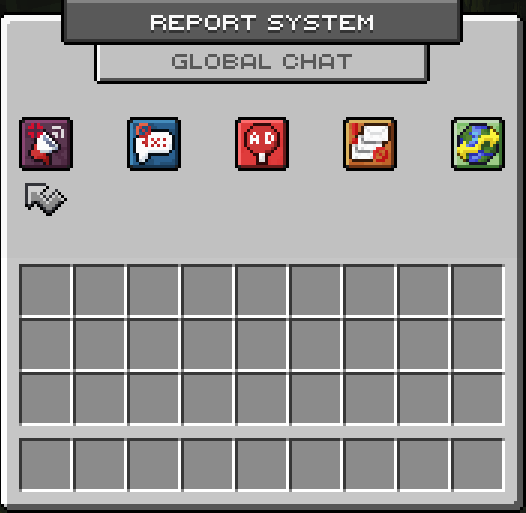
If you want to report a rule violation, type `/report ` (example: **/report FlooTastisch**) in the chat. When you have done that, you will see the following menu:
Main menu of the Report System
You have the possibility to report either global messages  or private messages  of a player. You can read more about this under [Global & Private Messages](#global-and-private-messages).
Then you can specify the type of rule violation.
Submenu for selecting the respective violation
You can find out more about the individual violations under [Violations](#violations).
When you have selected the most appropriate violation, you only need to confirm the report and it will be forwarded to the team for review.
{% hint style="warning" %}
Please do not abuse this system. Abuse will also lead to punishments!
{% endhint %}
You will receive feedback afterwards whether the player you reported was punished by the team or not. The reported player will also be notified if he has broken the rules. He must actively confirm this notification, also called a **warning** in this system.
### Global & Private Messages
Below you will find out what is meant by global messages and what is meant by private messages.
#### Global Chat
The global chat includes all messages that you simply send to the general public chat. These messages are sent to all players in the same [lobby](/english/systems/lobby-system.md). Other (semi) public chats like the realm chat are currently **not** included.
#### Private Chat
Private chats only include conversations held via the `/msg ` command.
### Violations
Currently you have the following options:
* Provocation 
* Insulting 
* Advertising 
* Spam 
* Trading across servers 
If you are not sure which violation to select, choose the most appropriate violation for you. You will not be punished for reporting a valid violation of the [rules](/english/general/rules-and-regulations.md), but selecting the "wrong" violation in this menu.