> For the complete documentation index, see [llms.txt](https://wiki.landania.net/llms.txt). Markdown versions of documentation pages are available by appending `.md` to page URLs; this page is available as [Markdown](https://wiki.landania.net/english/general/found-a-bug.md).
# Found a bug?
You have discovered a bug on Landania and would like it to be fixed? Here you can learn everything about our bug report system.
You have discovered a bug on Landania and would like it to be fixed? - No problem at all!
You can easily report bugs from within the game and we will look at your report as soon as possible - we promise!
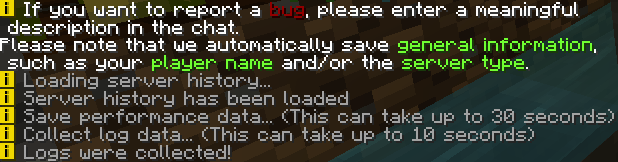
To report a bug, simply type the command /bug in the chat. Our system will ask you for a detailed description of the bug. Please try to describe the issue as understandable as possible, so that we know what you mean.
Output in the chat when you type /bug
{% hint style="info" %}
Not sure what to write? \
Try it like this: *"I wanted to do ... In the process ... happened. I expected that ... would happen."*
{% endhint %}
{% hint style="warning" %}
Information such as your player name and the server you are on is automatically saved.
{% endhint %}
For this reason it takes some time to send your bug report.
It may take some time until your message is completed. We still collect some data here fully automatically - don't worry!
#### What happens next?
{% hint style="success" %}
At this point, you don't need to do anymore, thanks for your engagement! :clap:
{% endhint %}
We will look at your message as soon as possible and assign a priority, which represents the urgency of the bug fix.\
According to this priority, we work through all received messages one after the other.
However, you do not have to take care of anything - it all happens in the background. 😉\
But please understand if we can't fix your message immediately, because there are more urgent things.
If we still have questions, we will try to contact you via a ticket on our Discord server. For this it is important that you are a member of the Discord server and that you are verified there. You can read how to do that [here](/english/general/discord-server.md).
Reporting a found error is therefore very easy with us and does not take much time.
Thanks for your effort! ❤️